Detect config drift in MongoDB and Postgres
"Config drift" usually means servers that no longer match their Terraform. This page is about the config your app reads from its own database: pricing rules, prompts, feature flags, routing. Those records drift too, every time someone edits one outside the process you trust.
Here is how to find those edits, see exactly what changed, and decide what to keep, with cfgit. Every output is from a real run of cfgit 0.6.5 on Postgres 16.
What drift looks like
A plan is recorded with 20 seats. Someone opens the admin panel and changes it to 10. Nothing in your review process saw it, the app now serves 10, and the next script or deploy that writes the record from its own copy will silently put 20 back.
The same happens with prompts edited in a database GUI, flags flipped from mongosh, or values changed by an agent with raw database access. The value running in production is not the one anyone reviewed.
How cfgit detects it
Every version cfgit records carries a content hash of the document. To check a record, cfgit hashes the live document the same way and compares it with the hash of the last recorded version. A difference means the record changed outside cfgit. Fields listed in ignore_fields, such as updated_at, are left out so routine noise does not count.
[[collection]]
name = "pricing_rules"
id_field = "rule_id"
ignore_fields = ["updated_at", "updated_by"]
Find drifted records
cfg status lists every tracked record with its state. Here someone ran a hand edit on the Pro plan:
UPDATE pricing_rules SET doc = jsonb_set(jsonb_set(doc, '{price_usd}', '19'), '{trial_days}', '60') WHERE rule_id = 'pro_monthly';$ cfg status
pricing_rules:pro_monthly changed_outside_cfgit
pricing_rules:team_annual cleanSee exactly what changed
cfg diff compares the recorded head with what is live, field by field.
$ cfg diff pricing_rules:pro_monthly =HEAD =live
change price_usd
  before: 29
  after:  19
change trial_days
  before: 14
  after:  60
Keep it or discard it
If the edit was right, cfg adopt records it as a new version with your name and a reason:
$ cfg adopt pricing_rules:team_annual -m "keep the 10-seat change from the admin panel"
pricing_rules:team_annual: adopted @2  eb932b3dc53d
If it was a mistake, cfg restore --discard-drift puts back what was recorded. The overwritten live document is kept in the restore entry, so the edit stays on record:
$ cfg restore pricing_rules:pro_monthly =HEAD --discard-drift -m "undo the hand edit to pro pricing"
pricing_rules:pro_monthly: restored @4  622738e77f26

$ cfg status
pricing_rules:pro_monthly clean
pricing_rules:team_annual clean
Why writes wait for a decision
Until someone adopts or discards the edit, cfgit refuses to write over a drifted record, and says what to do next:
$ cfg set pricing_rules:team_annual price_usd=300 -m "annual to 300"
pricing_rules:team_annual: changed outside cfgit
The live record differs from what cfgit last recorded: something wrote it
outside cfgit.
→ Look at the drift. Keep it with adopt, or throw it away with restore
  --discard-drift (the discarded doc stays in history). Then retry.
  Try:
    cfg diff pricing_rules:team_annual '=HEAD' '=live'
    cfg adopt pricing_rules:team_annual -m 'adopt out-of-band change'
    cfg restore pricing_rules:team_annual '=HEAD' --discard-drift -m 'discard drift'
That refusal is the point: a change made from your tooling never silently erases a change made somewhere else.
In the web UI
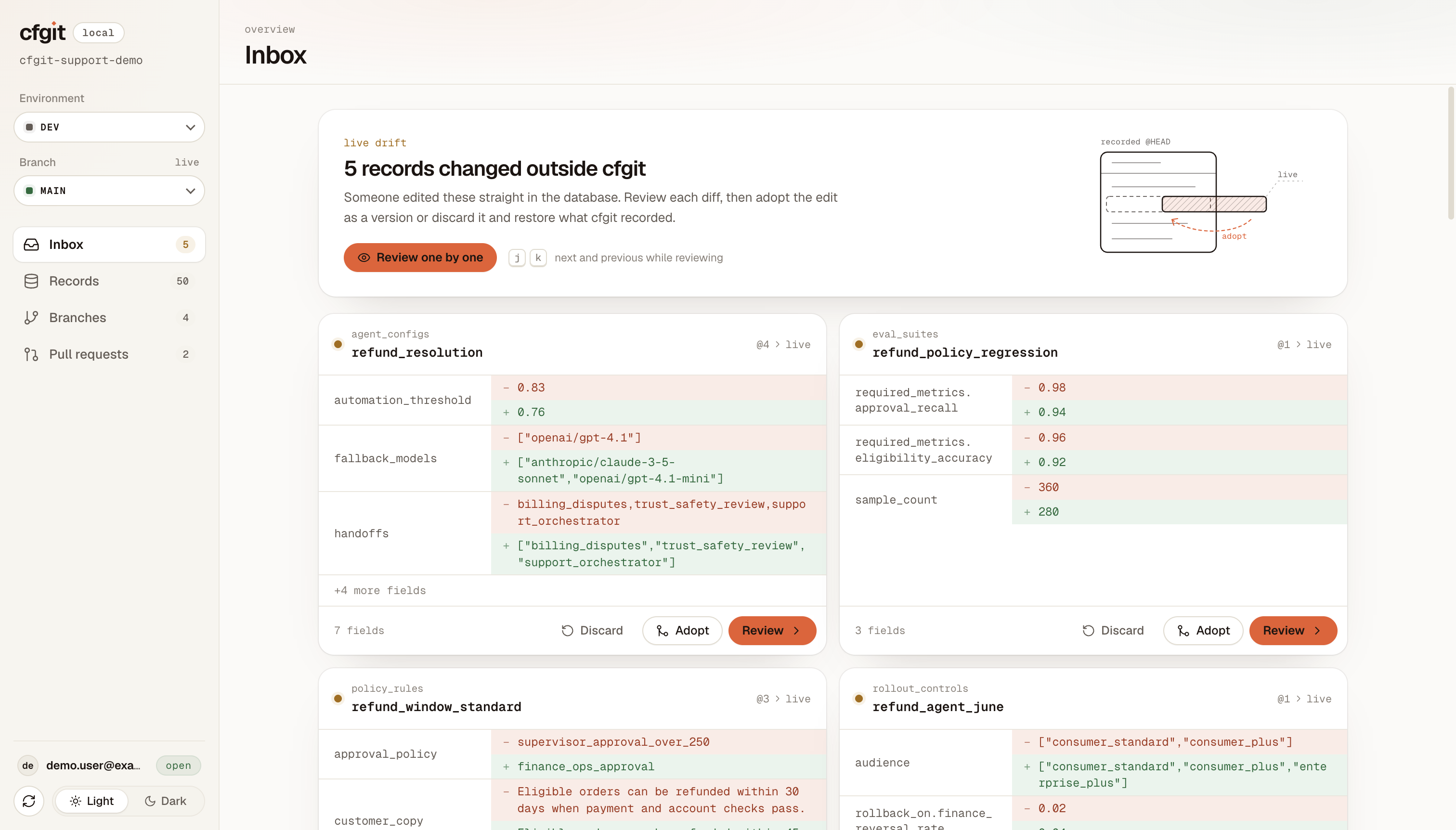
cfg ui opens a local web UI on an inbox of drifted records. Each card shows the changed fields, recorded against live, with Discard, Adopt and Review.
Check it in CI or on a schedule
cfg status exits with code 2 when any record has drifted and 0 when everything matches:
$ cfg status > /dev/null; echo "exit code: $?"
exit code: 2        # a record has drifted

$ cfg status > /dev/null; echo "exit code: $?"
exit code: 0        # everything matches what cfgit recorded
Run it in a CI job before deploys, or on a schedule, and fail or alert on a non-zero exit. cfg status --json gives the same result as structured output.
MongoDB and Postgres
The commands are the same for both. On Postgres, cfgit compares the doc jsonb column of each row; on MongoDB, the whole document. MongoDB needs a replica set for cfgit's transactional writes. Setup for each is in the Postgres guide and the MongoDB guide.
Other ways to detect drift
- Triggers or change streams capture every write, but you build the comparison, the history view and the restore yourself.
- Audit logs record who ran which operation, not the document before and after.
- Schema drift tools such as Atlas compare table structure, not the contents of config rows.
The trade-offs are laid out in version control for database config: the options compared.
Questions
What is config drift in a database?
It is when a config record your app reads, such as a pricing rule, prompt or feature flag, no longer matches the version your team last recorded, because someone or something edited it directly: an admin panel, a SQL or mongosh session, a script or an agent.
Does cfgit stop people editing the database directly?
No. It does not sit in the write path. It notices the edit afterwards, shows the change and refuses to write over it until someone adopts or discards it.
Can I check for drift in CI or on a schedule?
Yes. cfg status exits with code 2 when any record has drifted and 0 when everything matches, so a CI step or cron job can fail or alert on it.
Is a discarded edit lost?
No. restore --discard-drift keeps the overwritten live document in the restore entry, so the out-of-band change stays on record.
Do fields like updated_at count as drift?
Only if you want them to. Each collection can list ignore_fields, and cfgit leaves those out when it compares the live record with the recorded one.